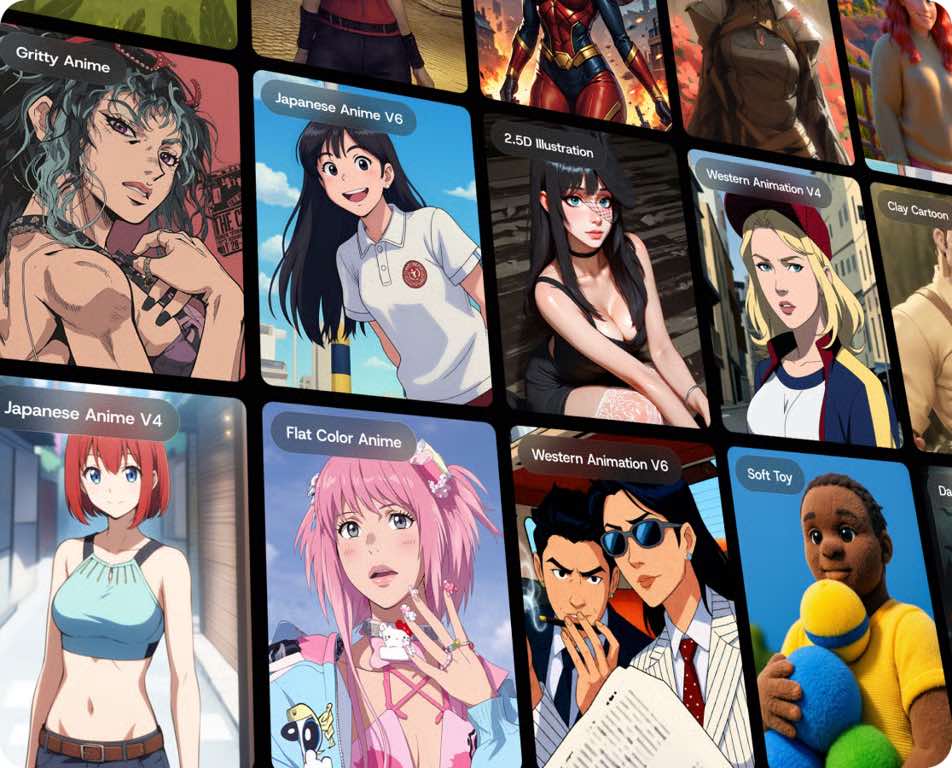
DomoAI is the creative platform that brings every image and video AI tool you need into one unified workspace, eliminating the costly chaos of juggling multiple subscriptions. Instead of hopping between scattered apps for generation, editing, animation, and upscaling, you get a single hub where your entire creative process flows from idea to finished asset.
What is the DomoAI creative platform?
DomoAI is an all-in-one AI-powered solution designed for generating and transforming both images and videos. It solves the core problem creators face today: fragmented workflows that force you to switch between different tools, pay for multiple subscriptions, and worry about data security. By integrating video generation, image editing, animation, styling, and upscaling into a single creative workspace, DomoAI lets you move from raw concept to polished output without ever leaving the platform. Whether you're a beginner making your first AI video or a professional fine-tuning complex animations, the platform is built to be accessible while still offering the depth you need for serious work.
Core video generation tools in DomoAI
DomoAI's video suite covers every major way you might want to create motion content. These seven tools work together so you can start from nothing, remix existing footage, or bring characters to life.
- Text to Video, Turn written prompts into full video sequences. Choose from style models like Japanese anime, realistic, pixel, cartoon game, flat color anime, or 90s style, then set duration and aspect ratio. You can even optimize your prompt with AI assistance for better results.
- Image to Video, Animate any still image using the "Animate" function. Upload a photo, and DomoAI will combine it into a moving sequence, preserving the original look while adding motion.
- Frames to Video, Provide multiple frames or reference images, and the platform will interpolate them into a smooth, consistent video. This is ideal for creating transitions or building animations from storyboard-style inputs.
- Character to Video, Maintain character consistency across scenes by feeding in a reference character image. The AI keeps the same identity while generating new movements and actions.
- Video to Video, Restyle existing footage into a different aesthetic. Apply over 30 styles, from anime to 3D animation to realistic, to transform the look of your source material while keeping the underlying motion intact.
- Talking Avatar, Create dynamic talking images by uploading a photo or video, attaching an audio file, or typing text that gets converted to speech. Multiple languages are supported, with six male and six female voices to choose from.
- Video Upscaler, Scale any moving sequence to 4K quality. This is essential when you need higher resolution for professional distribution or large-format displays.
These tools are designed to complement each other. For example, you can generate a character with Text to Image, animate it with Image to Video, restyle the result with Video to Video, and then upscale the final output, all in one session.
Core image editing and manipulation tools
Beyond video, DomoAI provides a full image editing suite that handles everything from creation to restoration. These eight tools give you complete control over still visuals.
- Text to Image, Generate images directly from text prompts, using the same style models available for video. This is your starting point for creating original visuals from scratch.
- AI Image Editor, Upload up to nine images at once and describe your edits in plain language. Change backgrounds, apply styles, blend characters, or enhance details. The AI handles everything while preserving character consistency and outputting high-resolution results.
- Image Upscaler, Increase the resolution of any image, bringing it up to 4K quality. This is useful for preparing visuals for print, large screens, or further editing.
- Background Remover, Cleanly separate subjects from their backgrounds with a single click. This is essential for compositing, product shots, or creating transparent assets for other projects.
- Face Swap, Replace faces in images while maintaining natural lighting and expression. This works for fun edits or for maintaining brand consistency across a series of visuals.
- Image Extender, Expand an image beyond its original borders. The AI fills in the new areas seamlessly, making it easy to change aspect ratios or add context to a scene.
- Old Photo Restoration, Repair damaged or faded photos. The tool removes scratches, restores color, and sharpens details, bringing old memories back to life.
- Anime Card Maker, Transform images into anime-style trading cards with unique borders and effects. This is a fun way to create collectible-style visuals for fans or social media.
All these tools share the same underlying engine, so you can combine them freely. For instance, restore an old photo, upscale it, remove the background, and then animate it as a talking avatar, without ever switching platforms.
How DomoAI's Relax Mode saves you money
The most cost-effective feature in DomoAI is Relax Mode, available on Standard and Pro plans. When you enable Relax Mode, generations become unlimited and credit-free. This means you can create as many videos and images as you want without watching your credit balance dwindle. Fast Mode, by contrast, consumes credits for quicker output, useful when you're on a tight deadline. But for everyday creative work, Relax Mode is the practical choice. It replaces the need for multiple simultaneous subscriptions to different AI tools. Instead of paying for a separate video generator, an image editor, an upscaler, and an animation tool, you pay for one plan that covers everything. The unlimited nature of Relax Mode means you can iterate freely, experiment with different styles, and generate dozens of variations without worrying about cost. This is a direct answer to the high costs that plague fragmented creative workflows.
Who is DomoAI for and what can you create?
DomoAI is built for content creators, bloggers, and individual artists who need to maintain a recognizable voice across their social channels. You can use the platform to join viral trends, create consistent character animations, upscale existing footage, and remove backgrounds for further editing. The commercial usage rights mean anything you create, animations, images, or videos, can be used in paid projects, client work, or monetized content. With over 30 styles available, you can match your output to your brand's aesthetic, whether that's anime, 3D animation, realistic, or artistic visuals. The platform is accessible for all skill levels: beginners can create simple videos with minimal effort, while professionals can fine-tune animations using motion capture and style references. You can access DomoAI through its official website or Discord server, making it easy to integrate into your existing workflow. The platform's design encourages experimentation, so you can try different combinations of tools and styles to find what works best for your audience.
Important things to know before you start
Before diving in, there are a few practical details to keep in mind. You must be at least 18 years old to use DomoAI, or have permission from a parent or guardian if you're younger. The platform's generative AI usage policy strictly prohibits creating harmful content, including anything that violates laws, harms minors, spreads misinformation, or promotes violence. Supported export formats include common video types like MP4, AVI, and MOV, as well as image formats such as JPEG and PNG. This covers most distribution needs, from social media uploads to client deliverables.
One important limitation: DomoAI is not a replacement for full timeline video editors. If you need precise music mixing, subtitles, legal text, or beat-level cuts, you'll still need a dedicated editing tool. Additionally, it's recommended to add final text elements like captions or prices using an external editor after generation. AI video models can sometimes distort text, so adding it in post-production ensures clean, readable results. Keep these points in mind, and you'll avoid common pitfalls while getting the most out of the platform.
Final thoughts on DomoAI
DomoAI delivers on its promise as a unified creative workspace. It consolidates video generation, image editing, animation, styling, and upscaling into one platform, eliminating the fragmentation that plagues most creators' workflows. The Relax Mode on Standard and Pro plans provides unlimited, credit-free generations, making it a cost-effective replacement for multiple subscriptions. Whether you're a blogger creating consistent visual content, a content creator producing animated videos, or a professional fine-tuning high-quality assets, DomoAI gives you the tools you need in one place. The platform's accessibility means you can start creating immediately, regardless of your experience level. Try it today and see how your best ideas become reality.
\nRelated reading: How AI Image Generators Are Changing Visual Content for Tech Writers, How Content Creators Use AI Transcription to Repurpose Video and Audio, and What Today's AI Image Generators Can Do for Bloggers and Marketers.