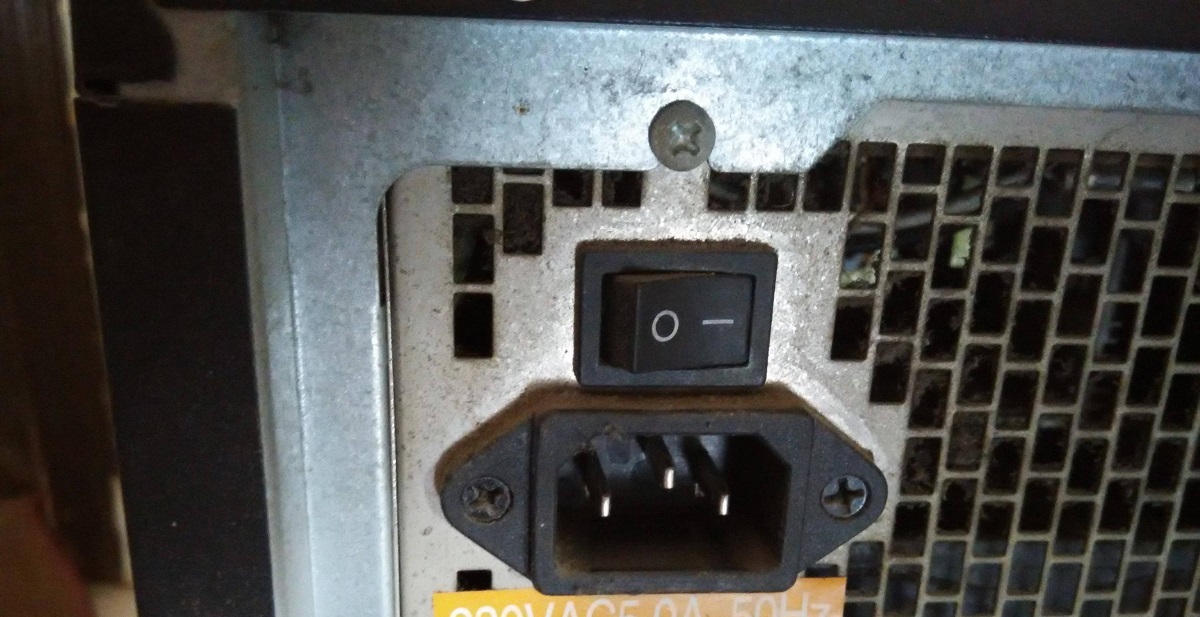
If you’re staring at the rocker switch on your power supply and need to know which symbol means off on a PSU, the answer is the circle (O). The vertical line (I) means on, and the circle (O) means off, following the same binary logic that uses 0 for off and 1 for on.
Which symbol means off on a PSU?
The circle (O) is the symbol that means off on a PSU, while the vertical line (I) means on. This is not a random design choice, it mirrors the binary system where 0 represents no power and 1 represents power flowing. So when you press the side of the rocker switch marked with the circle, you’re cutting power to the unit entirely. This is the symbol to look for when you want to safely shut down your PC for hardware work or troubleshooting.
The binary logic behind the I and O power symbols
The I and O symbols on a PSU are directly tied to binary code. The vertical line (I) represents the digit 1, meaning a closed circuit where electricity can flow. The circle (O) represents the digit 0, meaning an open circuit that stops the current. This is why the symbols look the way they do, they’re not just abstract marks but a visual shorthand for the two states of a simple electrical switch. When you see the I, power is allowed through; when you see the O, the path is broken. This binary connection makes the symbols intuitive once you know what they stand for, and it’s the reason they appear on nearly every PSU rocker switch regardless of brand or model.
How the rocker switch physically cuts power
The rocker switch on a PSU works by physically moving a metal contact inside the switch housing. When you press the side marked with the circle (O), the contact lifts away from the terminal, opening the circuit and stopping the flow of electricity. This is a mechanical action, not an electronic one, there’s no standby circuitry or soft-off state involved. The moment the contact separates, the PSU stops delivering power to your system entirely. This is different from pressing the power button on your PC case, which sends a signal to the motherboard to enter a shutdown sequence. The rocker switch, by contrast, cuts power at the source, which is why it’s the correct way to ensure your components are fully de-energized before you open the case or handle any internal hardware.
The standby symbol is different from the off symbol
It’s easy to confuse the circle (O) on a PSU rocker switch with the universal standby symbol (⏻), but they are not the same thing. The standby symbol, a circle with a vertical line through the top, indicates a low-power state where the device is still connected to the mains and drawing a small amount of electricity to keep standby functions alive. This is common on laptops, TVs, and desktop PCs when they’re “off” but still plugged in. The circle (O) on a PSU, however, means a complete power disconnection. When you flip the rocker switch to the O position, no power flows to the PSU at all, so there’s no standby current, no trickle voltage, and no risk of components receiving power. This distinction matters because a device showing the standby symbol is still consuming power and can be turned on remotely or via a signal, whereas a PSU with the O symbol engaged is truly dead until you flip the switch back.
Identifying the symbols on your specific PSU
While the I and O symbols are the standard across virtually all PSUs, you may encounter slight variations in how they’re printed on the rocker switch. Some manufacturers use a full circle for off, while others use a crescent shape or a circle with a line through it. A few PSUs might even label the switch with text like “ON” and “OFF” in addition to or instead of the symbols. These differences are cosmetic, not functional, the meaning remains the same. If you’re ever unsure which symbol corresponds to which state on your specific unit, the safest move is to consult the manual that came with your PSU. The manual will show you exactly which side of the switch is which, so you can be confident before you power down your system. In the rare case that your PSU uses a non-standard symbol, the manual is your definitive reference, and it’s better to check than to assume and risk leaving your system powered when you need it off.
\nRelated reading: Why Won't My iPhone Charge On A Charging Pad, Why Does My Playstation Keep Overheating, and How To Get Your Mouse Back On Chromebook.