You can watch Turkish shows with English subtitles on major streaming platforms like Netflix, Amazon Prime Video, and Disney+, as well as on YouTube. The availability of specific Turkish series and English subtitle options varies by country due to licensing agreements, so your regional library will determine what is accessible.
Where to watch Turkish shows with English subtitles
The primary legitimate streaming platforms for watching Turkish shows with English subtitles are Netflix, Amazon Prime Video, and Disney+. YouTube also hosts some episodes through official channels, though the selection is less consistent. For a direct answer, these services offer the most reliable and high-quality viewing experience. Regional availability of both the shows and the subtitle tracks will differ based on licensing deals in your country.
How to enable English subtitles on Netflix
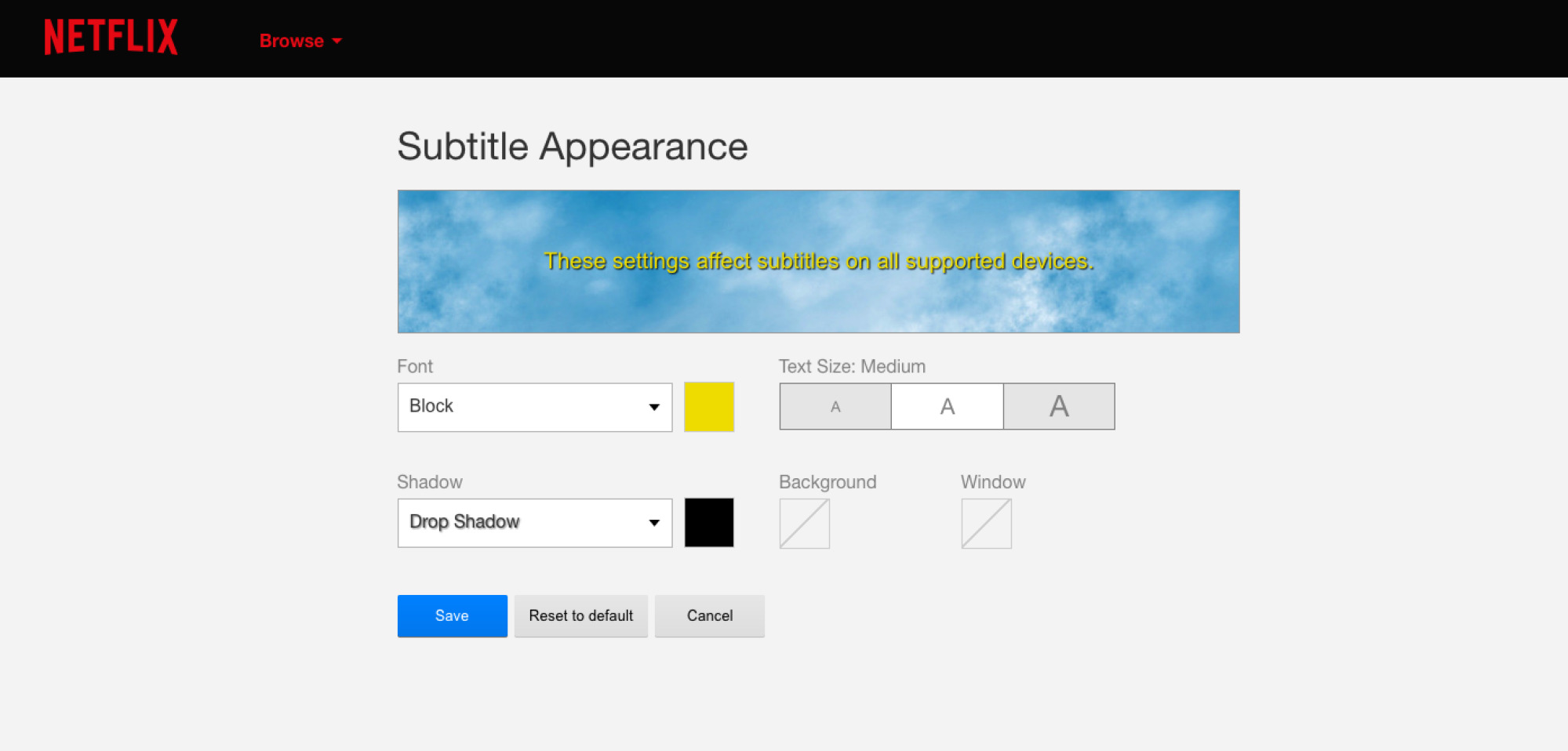
To enable English subtitles on Netflix, start playing a title, then tap or click the screen or press up or down on your remote to access playback controls. Select the "Audio & Subtitles" icon (often a text box or speech bubble) and choose your desired English subtitle option. You can customize subtitle appearance (font, size, shadow, and background color) via the "Subtitle appearance" section in your account settings on a web browser. On some devices, you can adjust size and style from player controls during playback, but connected TV devices may not offer all options available on a web browser.
How to enable English subtitles on Amazon Prime Video
To enable English subtitles on Amazon Prime Video, during playback, select the "Closed Caption" or "Subtitles" icon (often a speech bubble or "CC") from the playback menu. This icon may require tapping the screen on mobile/web or pressing the enter button on a remote for connected devices. Amazon Prime Video allows adjustment of subtitle size and color via the "Subtitles Settings" menu. Presets can be created on some devices, but Roku devices require editing presets in their system settings.
How to enable English subtitles on Disney+
To enable subtitles on Disney+, while watching a video, open the settings menu (often a speech bubble or keyboard icon). On web and mobile, it's in the top right; on TV-connected devices, it's in the bottom right. Select your desired subtitle language, such as English. Disney+ allows formatting of subtitle appearance. On the web, settings are exposed in the player. On mobile, Roku, Apple TV, and game consoles, styling is set through the device's system accessibility settings, not directly within the Disney+ app.
Popular Turkish shows to get you started
- Ertugrul: Resurrection (Diriliş: Ertuğrul), An epic historical drama following the life of Ertugrul, the father of Osman I, the founder of the Ottoman Empire.
- The Protector (Hakan: Muhafız), A fantasy-action series about a young man who discovers his connection to an ancient secret order and becomes the protector of Istanbul.
- Magnificent Century (Muhteşem Yüzyıl), A historical drama set in the sixteenth century, exploring the life and reign of Sultan Süleyman the Magnificent.
- Intersection (Kördüğüm), A contemporary drama following three close-knit friends entangled in love, passion, and betrayal.
- Endless Love (Kara Sevda), A romantic drama tracing the intertwined lives of Kemal and Nihan from youth through unexpected turns of fate.
Related reading: How Do I Download Movies To My iPad To Watch Offline? and Where Can I Watch Indian Series With English Subtitles.