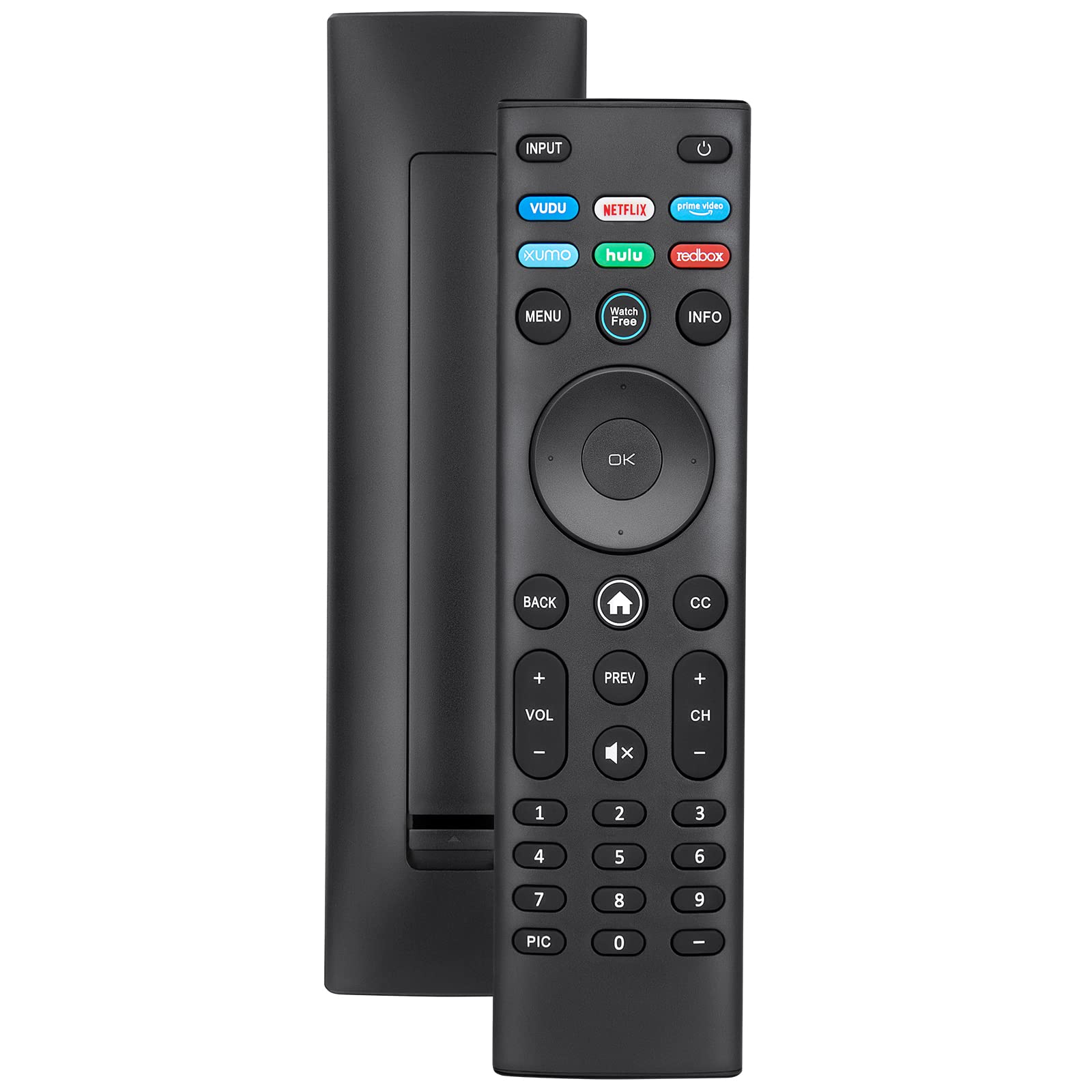
The best replacement for a lost or broken Vizio remote control for smart TV is either the official VIZIO XRT140 or XRT136 model, or the free VIZIO Mobile App for iOS and Android. For most users, the free app is the fastest solution because it requires no purchase and includes voice search, while the official remotes offer dedicated streaming buttons and work instantly without programming.
Why you need a new Vizio remote control for smart TV
There are three common scenarios that lead people to search for a new Vizio remote control for smart TV. The first is simply losing the original remote, a small black device that easily slips between couch cushions or gets carried out of the room. The second is physical damage: drops, spills, or worn-out buttons that stop responding after years of use. The third is upgrading, you want voice control, backlit buttons, or dedicated shortcut keys for Netflix and Hulu that your current remote lacks.
Fortunately, you have three solid solutions. The VIZIO Mobile App turns your phone into a full-featured remote at no cost. Official Vizio replacement remotes like the XRT140 and XRT136 are purpose-built for your TV and require zero setup. And universal remotes offer a budget-friendly alternative that works with multiple devices. Each option has its strengths, and this guide will help you choose the right one for your situation.
Use the free Vizio Mobile App as a remote
Before spending any money, consider the VIZIO Mobile App for iOS and Android. It is a complete remote control that replaces your physical device entirely. The app lets you power the TV on and off, adjust volume, change inputs, and cast content from your phone to the big screen. It also includes voice search, so you can say “show me action movies” or “open Netflix” and the TV responds instantly.
One standout feature is the lock screen TV control. You can access playback, volume, and closed captioning directly from your phone’s lock screen without unlocking it, perfect for when you’re mid-movie and just need to pause. The app also provides personalized recommendations based on your viewing habits. Since it’s free and works with all Vizio SmartCast TVs, it’s the first thing to try when your physical remote goes missing.
Official Vizio replacement remotes
If you prefer a physical remote, the two official options are the XRT140 and XRT136. The XRT140 is the more feature-rich model, with dedicated shortcut buttons for Vudu, Netflix, Prime Video, Disney+, Hulu, and Redbox. It also includes a WatchFree+ button for Vizio’s ad-supported streaming service. The XRT136 is a slightly simpler version with shortcuts for Hulu, Netflix, Vudu, Xumo, Crackle, and iHeartRadio.
Both remotes are compatible with virtually all Vizio Smart TVs, including D-Series, E-Series, M-Series, P-Series, PX-Series, and V-Series models from the last decade. They are preprogrammed with Vizio’s consistent IR signals, so they work out of the box with no pairing or programming required. Just insert two AAA batteries (not included) and you’re ready. Users consistently praise their sturdy construction and exact match to the original remote’s layout.
Infrared vs. Bluetooth: how to pair your Vizio remote
Understanding the difference between IR and Bluetooth remotes is key to a smooth setup. Infrared (IR) remotes, like the XRT140 and XRT136, are preprogrammed and work with all Vizio TV models for basic functions like power, volume, channels, and menu navigation. They require no setup at all. Just point them at the TV’s IR sensor and press buttons. Vizio uses consistent IR signals across its entire lineup, so any IR remote will control any Vizio TV for these core functions.
Bluetooth/SmartCast remotes with voice control require pairing. To pair one, insert fresh batteries, turn on the TV, and hold the pairing button, usually located inside the battery compartment, or marked with a ‘V’ or microphone icon. Hold it for 3-5 seconds until an on-screen prompt appears confirming the connection. Once paired, the remote can control the TV without line-of-sight and enables voice commands. If your remote becomes unresponsive, first replace the batteries, ensure a clear path to the IR sensor, and power-cycle the TV by unplugging it for 30 seconds. If that fails, remove the batteries, press every button for 5 seconds, then reinsert them to reset the remote.
Universal remotes that work with Vizio TVs
Universal remotes are a viable alternative, especially if you want to control multiple devices with one handset. They work with Vizio Smart TVs by entering specific programming codes. Common Vizio codes include 502, 627, 004, 1131, 1758, 2707, and 31517.
However, there’s good news for newer TV owners: Vizio Smart TVs released after 2022 generally do not require manual codes. They use automatic IR or SmartCast signals, so a universal remote will detect and pair with the TV automatically during setup. This makes modern universal remotes nearly as plug-and-play as official Vizio remotes. Just be aware that some universal remotes lack the dedicated streaming shortcut buttons found on official models, and voice control may not work unless the remote specifically supports it.
Frequently asked questions
Do all Vizio remotes have voice control? No. Voice control is only available on Bluetooth-enabled remotes like the XRT140 or the SmartCast remotes that come with newer Vizio TVs. IR-only remotes like the XRT136 do not have a microphone button.
Can I use a Vizio remote with a non-Vizio TV? Vizio remotes are optimized for Vizio TVs and may only offer basic IR functions (power, volume, input) on other brands. Full functionality like streaming shortcuts and voice control will not work. For non-Vizio TVs, use a universal remote instead.
Do all Vizio remotes have a finder function? No. Only select models, typically higher-end SmartCast remotes, include a “find remote” feature that makes the remote emit a sound or flash a light when you press a button on the TV. Most standard replacement remotes do not have this capability.
Will any Vizio remote work with any Vizio TV? For basic IR functions, yes, Vizio uses consistent IR signals across all models. However, for advanced features like voice control or app shortcuts, you need a remote that matches your TV’s SmartCast generation. Check the model number before purchasing.
What should I do if my new remote doesn’t work? First, confirm the batteries are fresh and installed correctly. For IR remotes, ensure nothing blocks the TV’s sensor. For Bluetooth remotes, repeat the pairing process. If issues persist, power-cycle the TV by unplugging it for 30 seconds, then try again.
\nRelated reading: How Can I Tell If My Vizio TV Is A Smart TV, How To Turn Off Voice Guide On Vizio Smart TV, and How Do I Know If My Vizio TV Is A Smart TV?.