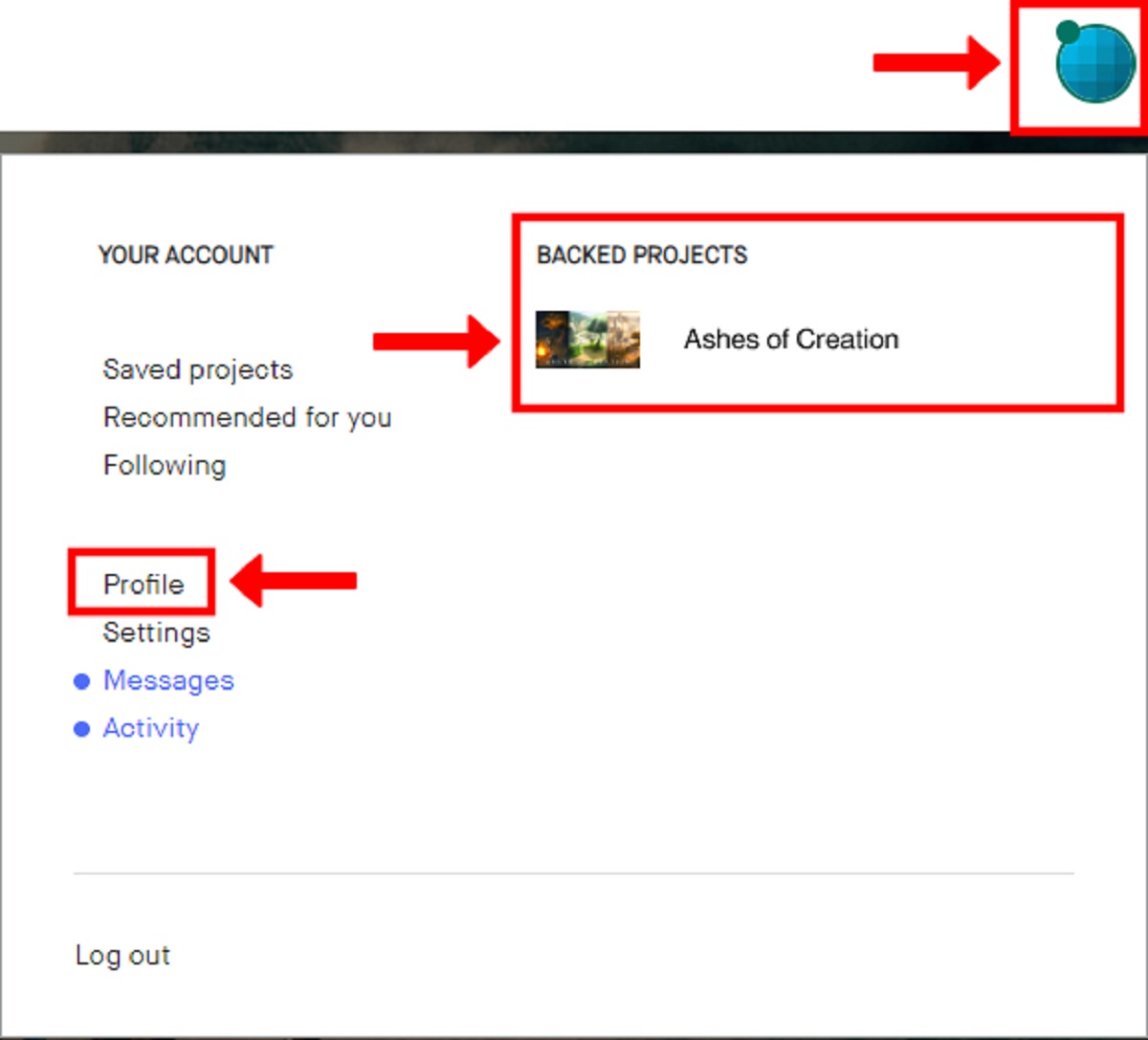
To find your Kickstarter backer number, log in to your Kickstarter account and click on your profile photo in the upper right corner. Then select “Backed Projects,” choose the specific project, click “View pledge,” and your unique backer number will appear at the bottom of the pledge details page, this is the fastest way to find kickstarter backer number for any project you’ve supported.
How to find your Kickstarter backer number on the website
Your backer number is assigned by Kickstarter when you pledge to a project, and it’s stored in your account’s pledge records. The website method below works for any project you backed during its original campaign, and it takes less than a minute once you’re logged in.
- Log in to your Kickstarter account using your registered email and password.
- Click your profile photo or avatar in the upper right corner of the page.
- From the dropdown menu, select “Backed Projects” to see every project you’ve supported.
- Locate the project you need the backer number for and click on its name to open the project page.
- Look for the banner that says “You backed this project” and click the “View pledge” link.
- Scroll to the bottom of the pledge details or reward summary page, your backer number will be displayed there, often labeled as “Backer #” or “Pledge ID.”
Write the number down or copy it somewhere safe. You’ll need it whenever you contact the creator about your reward, and it’s also useful for tracking your place in the project’s backer queue.
Why you might need your backer number
Creators and pledge managers use your Backer ID or Pledge Confirmation Number to verify your pledge when you ask about shipping, reward changes, or missing items. If you email a creator asking for a reward update, they’ll often request this number first, it’s the quickest way for them to pull up your exact pledge record. You might also need it when filling out a survey or when contacting support teams for a project that uses a third-party fulfillment service.
Having your backer number on hand also helps you confirm that your pledge was recorded correctly, especially if you backed multiple projects or changed your pledge amount after the campaign ended.
What if you can’t find your backer number?
If you made a preorder or late pledge outside of the original Kickstarter campaign, you typically will not have a traditional backer number, those pledges are tracked separately by the creator or their pledge manager. Similarly, BackerKit surveys do not display your original Kickstarter pledge number, so checking your survey email won’t help you locate it. In both cases, you must access your pledge details on the Kickstarter platform itself, not through any third-party tool.
If you’ve followed the steps above and still can’t see your backer number, the final option is to contact Kickstarter Support directly. They can look up your account and provide the number, but you’ll need to verify your identity by using the email address associated with your Kickstarter account. Support typically responds within a few business days, so include the project name and your pledge date in your message to speed things up.
\nRelated reading: How Do I Find My Clipboard On My Android Tablet, How To Enable P2P On Amcrest Camera, and How To Turn Off Windows P2P Settings.