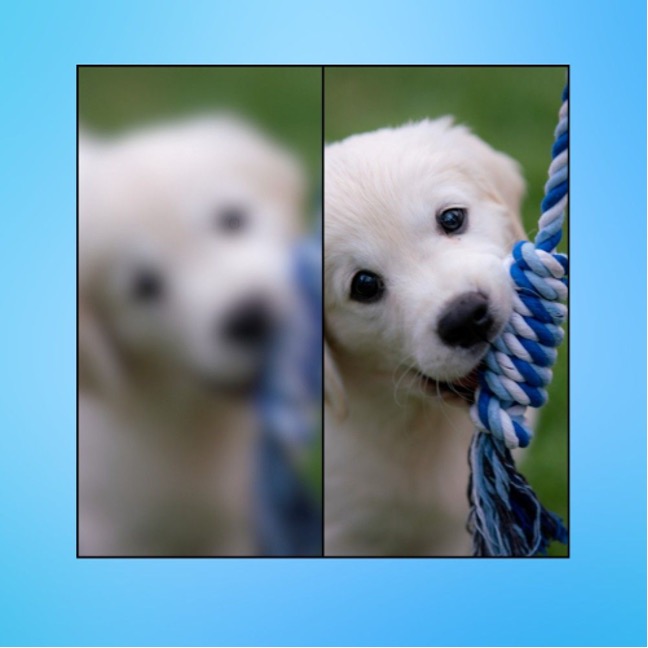
If you're looking for a free AI image sharpener that works instantly without complex software, the best options in 2024 are browser-based tools that use deep learning to fix blur and enhance details automatically. These tools analyze your photo's unique characteristics, like edges, textures, and noise, to produce a naturally sharpened result in seconds, all for free. Whether you need to fix a slightly out-of-focus portrait or a motion-blurred snapshot, these web, PC, and mobile solutions deliver professional-grade results without requiring any manual selection or masking.
What is a free AI image sharpener?
A free AI image sharpener is a software tool that uses deep learning models trained on massive image datasets to automatically reduce blur and enhance details. Unlike traditional sharpeners that blindly increase contrast along edges (which often creates halos and noise), these AI models are trained to recognize the difference between a person's skin, hair, fabric, and background. This allows them to apply the correct amount of sharpening to each element, reducing artifacts while making the image appear crisper and more defined. The AI essentially generates a new, sharper version of your photo by predicting what the original details should look like, rather than simply applying a filter.
Best free AI image sharpeners for web users
Web-based sharpeners are the most accessible option because they require no installation and work on any device with a browser. Here are the top free AI image sharpeners you can use directly online, each with specific strengths for different types of blur.
Media.io Image Sharpener
This is the most well-rounded free option for web users. Media.io uses a specialized AI model that fixes blurry photos, sharpens edges, and removes motion blur, offering specialized modes such as General, Motion Blur, Lens Blur, Soft Blur, and Very Blur. The tool is fully browser-based, so it works seamlessly on Windows, macOS, Android, and iOS. You can upload a JPG, PNG, or WebP file up to 25MB, and the AI automatically processes it in seconds. It also offers extra tools like color correction and upscaling, making it a complete quick-fix solution. The interface is exceptionally simple: upload, preview, and download. The only limitation is the 25MB file size cap and the lack of batch upload in the free version, but for single-image fixes, it's the best free choice.
VanceAI Image Sharpener
VanceAI is a close second, particularly known for its one-click unblur capabilities. It excels at smoothening edges and highlighting photo details, and it offers different AI sharpening models (Standard, Lens Blur, Soft Blur, and Motion Blur) to target specific problems. The web version is free for a limited number of credits per day, which is perfect for occasional use. It's particularly effective at removing motion blur and fixing out-of-focus images without creating artifacts. However, the web version doesn't support batch uploads, and the desktop variant is faster for heavy processing. For most users, the free web credits are enough to sharpen a handful of important photos.
Artguru AI
Artguru AI stands out because it automates the entire process with optimal settings, meaning you never need to manually adjust a slider. It uses a negative prompt option and offers dozens of AI styles to choose from, which is unique among sharpeners. This makes it ideal for users who want a "set and forget" tool. The AI does everything from sharpening to enhancing details, and it has an iPhone variant for mobile use. However, the free version gives you a limited number of credits, and some users find the credit system restrictive. It's best for those who want a creative touch alongside basic sharpening.
PicWish
PicWish was designed specifically for e-commerce and portrait restoration, making it the go-to choice for sharpening faces and product photos. It supports major formats like JPG, PNG, BMP, WebP, and JPEG, and you can load images directly via URL. Its exceptional face enhancement feature can recover facial details that other tools miss. The free version allows a few images per day, which is great for small tasks. However, bulk editing is only available in the mobile app, and you must log in to access all features. For sharpening portraits or product images with fine details, PicWish is a top contender.
Best free AI image sharpeners for PC users
For users who need more control, batch processing, or work with high-resolution files, desktop software is the better route. These tools often offer free trials or limited free versions that are more powerful than web tools.
AVCLabs PhotoPro AI
This is a professional-grade desktop application available for both macOS and Windows. It automatically reduces noise and increases resolution, and it can upscale images by 200%, 300%, or even 400% without quality loss. The AI sharpener is designed for both personal and professional needs, supporting JPG, JPEG, PNG, BMP, TIFF, and RAW formats. It also adjusts color balance and contrast automatically. While the full version is paid, it offers a free trial with a watermark. The downside is that bulk editing requires installing the full installer, and batch processing can be slow on slower internet connections. But for serious editing, its one-click enhancement and 4x upscaling are unmatched in this price range.
Topaz Photo AI (Updated)
Topaz Photo AI is the successor to the legacy Sharpen AI and now integrates all sharpening models into one app. It offers several specialized AI sharpening models: Standard for all-purpose sharpening with slight lens and motion blur; Strong for very blurry images (but it's recommended to try Standard first to avoid over-sharpening); Lens Blur for focus imperfections; Motion Blur for streaked effects; Refocus for finer lines and texture; Wildlife Sharpen for fur, feathers, and scales; and Portrait for high-resolution faces. The "Autopilot" feature automatically detects the subject and blur, then selects the appropriate model and strength. You can manually adjust the AI Model and use the "Strength" slider to control sharpening. A "Minor Denoise" slider removes noise that sharpening can accentuate, and the masking tool allows you to apply sharpening only to specific areas. Note that the Strong model doesn't have the Minor Denoise slider because it sharpens everything. Topaz recommends using high-resolution images (5MP or higher) with low-to-medium blur for best results. For low-resolution files, upscale first. The free trial lets you test the full power, but it's a paid tool after that. The legacy Sharpen AI is no longer supported and may have issues on newer operating systems.
Luminar
Luminar is an award-winning editor that uses AI's generative capabilities to unblur images. It supports RAW file editing and features batch processing, which is rare in free tools. It comes with multiple editing tools and presets, making it a full-fledged photo editor rather than just a sharpener. The free trial is limited, but it’s a great all-in-one solution for photographers who want to edit and sharpen in one place. The learning curve is steeper, and you must pay to unlock all features. However, its powerful AI and batch processing make it a favorite among pros.
ON1 Resize
ON1 Resize is regarded as the industry standard for photo enlargements. It uses AI to sharpen images while recovering incredible detail, and it allows for softproofing. This tool is designed for pro editors and photographers who need to print large formats. It supports batch processing and allows you to print directly from the app. While it's a paid tool ($79.99), it often has free trials. The AI sharpening is exceptional for enlargements, but it's overkill for simple web images. If you need to upscale and sharpen large files, this is the best choice, but it's not truly free.
Best free AI image sharpeners for mobile users
Mobile apps are perfect for on-the-go fixes, and these three apps offer the best one-tap AI enhancement features.
Lumii
Lumii is a mobile AI image sharpener that offers 100+ stylish and unique preset photo effects and filters. Its AI enhance feature is excellent, allowing you to load a picture from your gallery and sharpen it in a few taps. It has multiple templates that aid in using AI to sharpen images, and it offers 100+ Beauty AI effects. The interface is simple, with no ads while editing, and photos can be exported to other apps with ease. The free version has fewer ads, but they are still present. It's a great all-rounder for mobile users who want quick, stylish results.
Fotogenic
Fotogenic is a body and face editor developed for both beginners and professionals. It uses AI to sharpen images and has filters for weather, plants, texts, and more. The one-time payment model is unique, but the free version is limited. Pro subscribers get full features, including the "slimming" tool and advanced sharpening. While the sharpening is good, some tools like "slimming" aren't very effective. It's a good option if you want a full suite of editing tools alongside sharpening.
PhotoSoft
PhotoSoft is both an AI image sharpener and an AI art generator. It can export in 4K and upscales and generates different variations of a single image. The interface is simplistic and lightning-fast, making it easy to use. However, it has limited advanced features, and some effects might feel outdated compared to newer AI apps. It's best for users who want a quick, creative enhancement with the ability to generate artistic variations.
How to sharpen an image with AI
Using a free web tool like Media.io is the quickest way to sharpen an image. Here’s a step-by-step guide:
Step 1: Go to the Media.io Image Sharpener website and click "Upload Images." Your file browser will open so you can select the image you want to fix.
Step 2: The AI will automatically start processing the image upon upload. You'll see a preview of the sharpened result. On the right side, there are six AI options (General, Motion Blur, Lens Blur, Soft Blur, Very Blur). Select the one that best matches your photo's blur type. The preview updates instantly so you can compare.
Step 3: Once satisfied with the result, click the "Download" button to save the sharpened image to your device. That's all there is to it.
Frequently asked questions
Is it safe to use AI image sharpeners? Yes, but only if you use reputable tools. Free web tools should have clear privacy policies and not store your images permanently. Always use a popular, well-reviewed service to avoid security risks. Avoid uploading sensitive personal photos to unknown platforms.
Can AI sharpeners recover extremely blurred pictures? Yes, they can recover a significant amount of detail, but the effectiveness depends on the level of blur. Extremely blurry images can be recovered, but with much less detail than a slightly soft image. The AI can reconstruct edges and textures, but it can't create information that doesn't exist. For heavily smeared or out-of-focus images, results will be better than the original but not perfect.
Why use an AI image sharpener over traditional sharpening tools? Traditional sharpeners (like Unsharp Mask) increase contrast along edges, which often creates halos and amplifies noise. AI sharpeners analyze the image content and apply sharpening selectively, maintaining the original quality while reducing noise. They can also handle complex tasks like motion blur or face recovery, which traditional tools cannot. This leads to a more natural, cleaner result without the "crunchy" look.
\nRelated reading: How to Create Videos From Text Advanced Software and Online Tool, How To Get Free Ethereum In Metamask, and How AI Image Tools Are Changing the Way We Customize Wallpapers.