The Exact Banking Info for Direct Deposit: A Quick Checklist
To set up direct deposit, you only need two critical banking numbers: your routing number and your account number. These two pieces of banking info for direct deposit, combined with your personal details, are everything your employer or payment provider needs to send funds electronically into your account.
Here is the complete checklist of what you must gather before filling out any direct deposit form:
- Routing number (9 digits, identifies your bank)
- Account number (your unique account identifier)
- Account type (checking or savings)
- Bank name (as it appears on your statements)
- Full legal name (as it appears on your ID or Social Security card)
- Current address
- Phone number
- Email address
- Social Security Number (SSN) or Tax Identification Number (TIN) for payroll or government payments
- Employer name and address (if setting up payroll direct deposit)
That is the entire list. If you have these items ready, you can complete any direct deposit authorization form in under five minutes.
How to Find Your Routing and Account Numbers Right Now
The most common error in direct deposit setup is transposing or misreading the routing or account number. A single wrong digit can send your paycheck to the wrong account or cause a rejected deposit. Here is exactly how to locate both numbers with certainty.
On a Physical Check
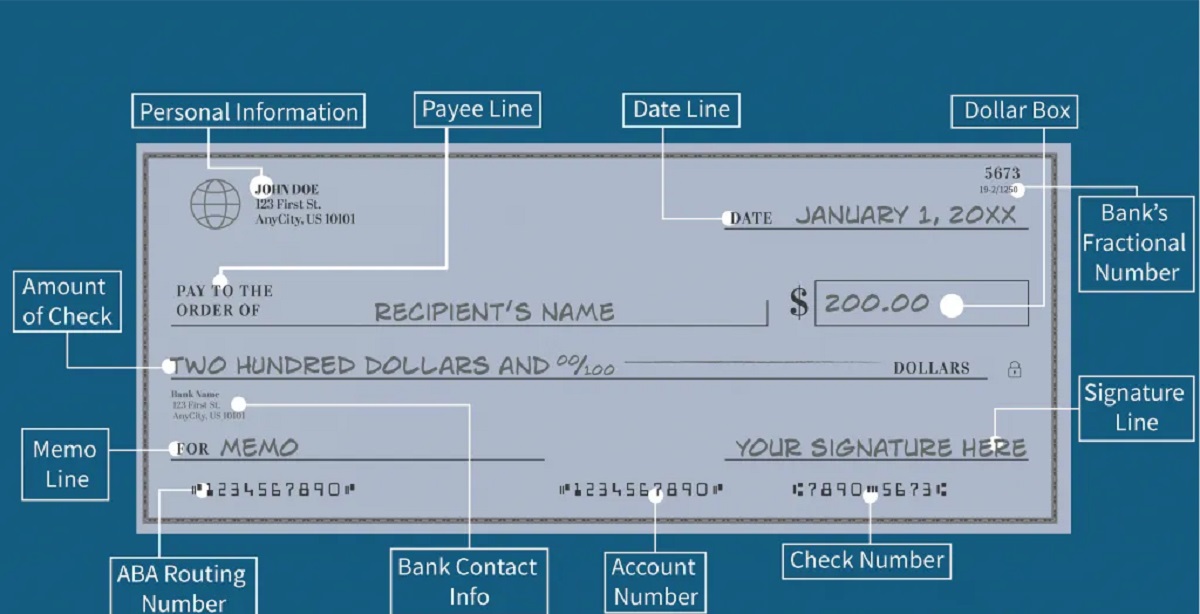
If you have a checkbook, look at the bottom of a check. You will see three sets of numbers printed in magnetic ink:
- The first nine digits on the left are your routing number.
- The middle set of digits is your account number.
- The last set is the check number, which you do not need for direct deposit.
Double-check that you are not accidentally copying the check number instead of the account number. The account number is always in the middle position.
On a Bank Statement
Your monthly paper or electronic statement lists both numbers near the top of the document. Look for a section labeled "Account details" or "Account summary." The routing number is typically labeled as "ABA routing number" or "routing number," and the account number is listed separately.
In Online Banking
Log in to your bank's website or mobile app and navigate to your account details page. Some apps allow you to copy the numbers directly with a tap.
If you cannot find the numbers through any of these methods, call the customer service number on the back of your debit card. The representative can verify your identity and provide both numbers. Never guess or estimate these digits, accuracy is non-negotiable.
Personal and Employer Details You Must Provide
Beyond the two banking numbers, your direct deposit form requires personal identification details and, for payroll, employer information. These fields exist for verification and tax compliance purposes.
Full legal name: Use exactly what appears on your government-issued ID or Social Security card. Nicknames, shortened versions, or middle-name variations can trigger verification failures.
Current residential address: Your bank and employer need your physical address for record-keeping. A P.O. box is acceptable in some cases, but a street address is preferred.
Phone number and email address: These allow your employer or the payment organization to contact you if there is an issue with the deposit. They also enable electronic notifications when funds arrive.
Social Security Number or Tax ID: For payroll direct deposits and government benefits, your SSN or TIN is required. This number verifies your identity and ensures the correct allocation of funds for tax reporting. If you do not have an SSN, you can provide a TIN issued by the IRS. Never share this number over unsecured channels or with unverified third parties.
Employer name and address: When setting up payroll direct deposit, you must provide your employer's official company name and mailing address. This information identifies the payer and is required on the authorization form. Some forms also request the employer's phone number, but this is less common.
If you are unsure whether a specific field applies to you, leave it blank and ask your HR representative before submitting the form. Providing incomplete or incorrect personal details can delay your first direct deposit by several days.
How to Set Up Direct Deposit in 3 Steps
The actual setup process is simple once you have gathered all the required information. Follow these three steps to get your payments flowing electronically.
Step 1: Gather Your Banking Info for Direct Deposit
Collect your routing number, account number, account type, and bank name. Write them down on a piece of paper or copy them into a secure note on your phone. Verify each digit against your check or online banking portal before proceeding.
Step 2: Complete Your Employer's Authorization Form
Most employers use a standard direct deposit authorization form. This form asks for your personal details, bank account information, and employer information. Fill it out completely and legibly. If your employer offers electronic submission through a payroll portal, enter the information directly into the system. If you are submitting a paper form, sign it where indicated and return it to your HR department or payroll administrator.
Some organizations require a voided check to verify your account details. If requested, provide a check marked "VOID" across the face. Do not use a check that has been written out or endorsed.
Step 3: Monitor Your Account
After submitting your form, your employer will verify the information and initiate the setup. The verification process typically takes one to two payroll cycles. Watch your bank account for the first deposit. Funds from direct deposits are typically available for withdrawal no later than the business day after the banking day on which the bank received the electronic payment. If your first deposit does not appear by the expected date, contact your payroll department immediately.
Once your first direct deposit lands, confirm that the amount matches your expected net pay. Then set up a notification in your banking app to alert you whenever a deposit is made. This simple step helps you spot errors or unauthorized activity quickly.
Common Questions About Direct Deposit Setup
Is Direct Deposit Safe?
Direct deposit uses the Automated Clearing House (ACH) network, which is a secure electronic payment system operated by financial institutions. The system includes multiple layers of verification and encryption. However, you must still protect your banking credentials. Never share your routing and account numbers with unverified parties, and never provide them in response to unsolicited emails or phone calls. If you want to protect your online banking, enable two-factor authentication on your bank account and use a unique, strong password.
What Happens If My Bank Account Information Changes?
If you switch banks or change accounts, you must update your direct deposit information with your employer. This typically requires submitting a new authorization form with the updated routing and account numbers. Notify your employer as soon as you open the new account to avoid a missed paycheck. Some employers allow you to update your information online, while others require a paper form.
Can I Have Direct Deposit Sent to an External Account?
Yes, you can have direct deposit sent to an external account in banking, meaning an account at a different bank than where your employer's payroll is processed. The routing and account numbers you provide simply need to correspond to the receiving account. There is no requirement that the account be at the same bank as your employer. However, be aware that some banks may charge a fee for receiving external ACH transfers, and the funds may take an extra business day to appear.
What If I Have Issues With My Direct Deposit?
If a deposit is missing, incorrect, or delayed, contact your employer's payroll department first. They are responsible for initiating the transfer and can trace the payment. If they confirm the transfer was sent, contact your bank with the transaction details. Most issues are resolved within one to two business days.
Direct deposit eliminates the need for paper checks, reduces the risk of lost or stolen payments, and gives you immediate access to your funds. By providing accurate banking info for direct deposit and following the steps above, you can ensure your payments arrive reliably every payday.